First-person operator method
What I Check Before Trusting Phone Numbers in a CRM Export
Use this practical CRM data cleanup check to catch scientific notation, lost leading zeros, extensions, and unsafe phone fields before follow-up.
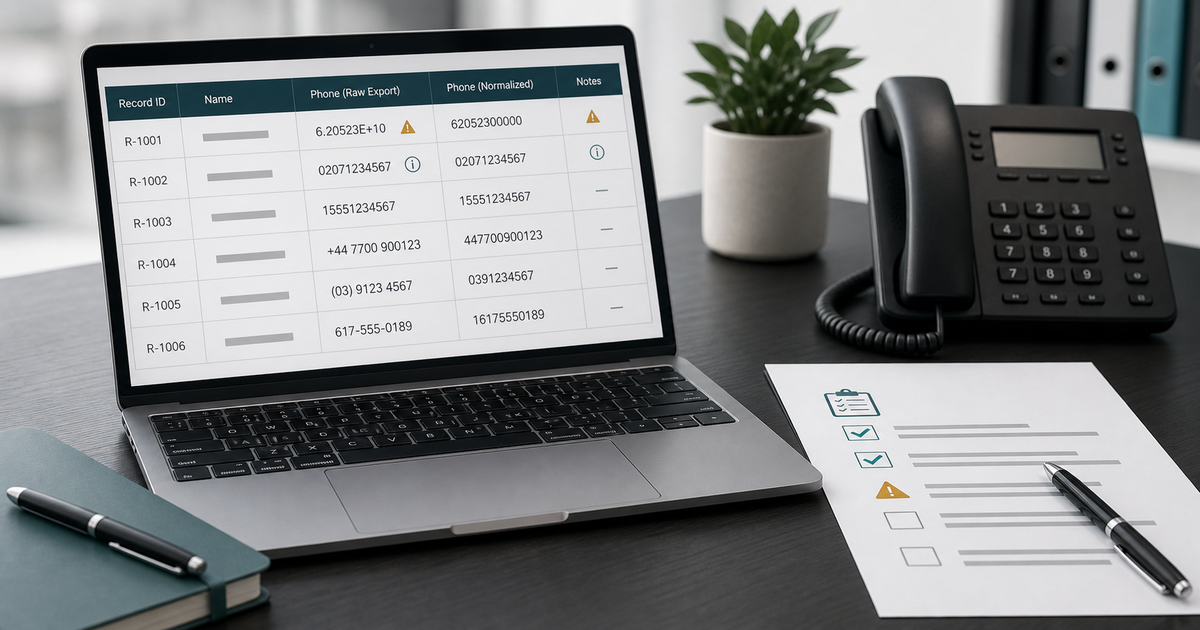
I do not trust a phone column because it looks tidy.
A spreadsheet can display ten clean digits while hiding the fact that a country code disappeared. It can show a value in scientific notation without changing the stored digits. It can also do the opposite: display something that looks recoverable after the underlying value has already been rounded or stripped.
That distinction matters during CRM data cleanup. If a contractor uses the wrong phone value for follow-up, the result is not merely a messy report. Someone may text the wrong person, call a number without enough context, or treat an unusable record as a missed opportunity.
My first check is therefore not “Does this column contain numbers?” It is “Can I prove that this value still represents the contact detail that entered the business?”
Short answer
Before using phone numbers from a CRM export, preserve the untouched source file and import the phone column as text. Compare a small sample against the original system or another source record. Check for scientific notation, missing plus signs, lost leading zeros, merged extensions, duplicate normalized values, and rows where the phone type is unknown.
Do not repair a damaged number by guessing. Keep the original value, add a separate normalized field, and mark uncertain rows for review.
A usable output should answer five questions for each row:
- What did the source export contain?
- Did the spreadsheet change the display only, or the stored value too?
- Is the number complete enough to normalize safely?
- Is it a mobile, landline, shared office line, or unknown type?
- Is there enough permission and conversation context to contact it?
The last question is easy to skip. A technically valid phone number is not automatically a valid reason to call or text.
Why a phone number should be treated as text
Phone numbers look numeric, but they are identifiers. You do not add them, average them, or use them in arithmetic.
Treating the field as a number can remove information that matters:
- A leading zero may be part of a national dialing format.
- A plus sign can show that the country code was intentionally included.
- Spaces, parentheses, and hyphens may reveal how a person entered the number.
- An extension may be separated by
x,ext, a comma, or another field. - A long value may exceed the precision a spreadsheet safely preserves as a number.
Formatting can be standardized later. The original string should survive first.
When I open an unfamiliar export, I make a working copy and force the phone columns to text before sorting, filtering, or saving. I keep the original file unchanged. If the first open already converted values, I go back to the original export rather than trying to reverse the conversion from appearance alone.
Scientific notation does not always mean the digits are gone
People often see something like 1.7275947645E+10 and assume the number has been destroyed. Sometimes the spreadsheet is only changing how the cell is displayed. Expanding the column or changing the cell format to text may reveal the full stored value.
Sometimes the value really has changed. Spreadsheet software commonly limits numeric precision. A long international number combined with an extension, an imported account ID, or a value with extra digits may be rounded after conversion. Once the source digits have been replaced, formatting the cell as text does not restore them.
This is the check I use:
- Inspect the cell's formula bar or raw value, not only the visible cell.
- Compare it with the untouched CSV in a plain-text viewer.
- Compare the same record with the CRM, call log, form notification, or another original source when access is available.
- Save a test copy, close it, reopen it, and confirm the value remains unchanged.
If those sources disagree, I do not select the version that looks most plausible. I label the phone field needs source confirmation.
How I check whether leading zeros were lost
Leading zeros are especially easy to miss because the remaining digits can still look like a normal phone number.
Suppose an export contains an international or local-format number that begins with 0. If the spreadsheet interprets it as a number, that zero may disappear. Adding a zero back based on the row's city is tempting, but location fields can be stale, copied, or unrelated to the customer's current number.
I look for evidence in this order:
- The raw CSV value.
- A form-submission email or call record created near the lead's first timestamp.
- A clearly labeled country field supplied with the original request.
- The CRM's unformatted phone field, if the review scope allows access.
- A prior customer message that contains the number in its original form.
If none of those resolves the value, the safe result is an unresolved phone field. Country code inference is not evidence.
That rule also applies when a US-based contractor receives an inquiry from someone traveling, relocating, or using an international mobile number. The service address and the phone number's country do not have to match.
Keep extensions separate from the main number
Extensions cause a different kind of damage. A value such as 7275947645 x204 may be imported into one field, split across columns, or reduced to a continuous string of digits.
I separate four pieces when the source supports them:
- Country code.
- National number.
- Extension.
- Raw value exactly as received.
The normalized phone field should not silently absorb the extension. A continuous value such as 17275947645204 can look like a valid long number even though the final digits were meant for an office extension.
When the delimiter is missing and the split point cannot be proved, the row stays on hold. A wrong extension is inconvenient; a guessed main number can reach a different person.
Normalize in a new column, never over the evidence
The safest spreadsheet layout keeps interpretation beside the evidence:
| Field | Example purpose |
|---|---|
phone_raw | Exact source string, unchanged |
phone_normalized | Standardized value when supported |
phone_extension | Extension kept separately |
phone_country_basis | Source of the country-code decision |
phone_type | Mobile, landline, office, shared, or unknown |
phone_review_status | Ready, hold, invalid, duplicate, or needs context |
phone_review_note | Short reason for the decision |
This makes the cleanup reversible. Another reviewer can see what changed and why.
I avoid overwriting phone_raw, even after normalization appears obvious. The raw value can expose a later import error, explain why two records failed to match, or show that punctuation carried useful extension information.
Duplicate detection needs more than stripped digits
A common cleanup shortcut removes every non-digit character and treats matching results as duplicates. That catches some formatting variants, but it can also create false matches.
Two records may share a main office number and have different extensions. A household may use one phone for two legitimate customers. A lead may submit a work number once and a mobile number later. Two countries can produce similar local strings when the country code is missing.
I use normalized digits as a candidate-matching signal, not a final duplicate decision. Before merging or suppressing a row, I compare:
- Email address and customer name.
- Service address or requested location.
- Inquiry time and source.
- Requested service.
- Conversation history and assigned owner.
- Extension and phone type.
If the evidence points to one conversation, the records can be grouped while both source rows remain traceable. If the context differs, the shared number alone is not enough to merge them.
A valid number can still be unsafe for follow-up
Phone cleanup and contact permission are separate decisions.
A record can contain a complete, correctly normalized mobile number and still belong in a hold queue. The person may have opted out. The number may come from an old customer record rather than the current inquiry. The latest message may ask for email only. The service request may already be closed. The number may belong to a property manager, tenant, spouse, dispatcher, or shared office.
Before an audit of contact fields before lead follow-up, I add the fields that explain why contact is appropriate:
- Source and timestamp of the current inquiry.
- Latest customer-visible message.
- Opt-out or do-not-contact status.
- Channel preference when it is explicit.
- Current owner and next action.
- Reason the record is still open.
I do not let “phone format valid” become a shortcut for “ready to contact.” Those are different statuses and should remain different columns.
What to do when the original file has already been changed
Sometimes the only available spreadsheet has already been opened, edited, and saved. In that case, recovery depends on evidence outside that file.
Start by freezing the damaged copy. Do not run another conversion, deduplication, or bulk replacement over it. Then look for:
- The original CRM export in Downloads or a dated archive.
- An earlier email attachment.
- A form-notification message with the submitted phone value.
- Call-tracking logs tied to the same timestamp.
- A backup or version history.
- A second export made directly from the source system.
Compare records by a stable field such as lead ID, inquiry timestamp, or email address. Do not compare by the damaged phone number alone.
If no source survives, classify the affected values by confidence. Some rows may be provably intact because the stored string and a prior message agree. Others may be unusable. A useful cleanup report says which is which; it does not pretend every row can be repaired.
A small test before touching the full export
I prefer a bounded sample because it exposes the transformation rules without risking the whole file.
Choose records that cover the awkward cases:
- One normal ten-digit local number.
- One value with a plus sign and country code.
- One number with a leading zero.
- One office number with an extension.
- One blank or clearly invalid value.
- One pair that looks duplicated after punctuation is removed.
- One record with an opt-out or channel restriction.
Import those rows as text, normalize them in separate columns, and document each decision. Then reopen the test file and check it again. If the process cannot preserve and explain that sample, it is not ready for hundreds of records.
This is also why a first review should not start with a mass call or text campaign. The cleanup output needs to earn that next step.
How AI Cleanup Doctor handles this kind of sample
AI Cleanup Doctor is designed for a bounded, redacted first scan rather than unrestricted CRM access. A buyer can provide up to 25 representative lead rows without sharing a login.
For a phone-field review, the useful columns are the raw phone value, source, timestamp, service request, latest message, current status, owner, and any visible contact restriction. Names and other unnecessary personal details should be redacted before the sample is shared.
The review can separate rows into outcomes such as:
- Ready for a human to review the next action.
- Hold because country code, extension, ownership, or permission is unclear.
- Duplicate candidate that needs context before merging.
- Invalid or damaged phone value.
- Missing context that should be retrieved from the source system.
The output is a decision aid, not a guarantee that a number is owned by a particular person or that contact is legally permitted. A phone validation service, legal review, or source-system check may still be needed.
My final pre-follow-up check
Before I call a phone column clean, I filter for blanks, very short values, unexpectedly long values, scientific notation, missing country information, extensions, repeated normalized numbers, and rows changed without a note.
Then I ask one plain question: could another person reproduce this decision from the source evidence?
If the answer is no, the row is not ready. It may be fixable, but it belongs in a hold queue rather than a follow-up list.
Good CRM data cleanup does not make every phone number look the same. It preserves what arrived, records what changed, and keeps uncertainty visible long enough for someone to resolve it.
Frequently asked questions
How do I fix phone numbers in scientific notation in a CSV?
First check the untouched CSV in a plain-text viewer. Import the phone column as text instead of opening it with automatic number detection. If only the display changed, the original digits may still be present. If the stored value was rounded or overwritten, return to the source export or another original record; changing the format cannot recreate lost digits.
Can I add a missing leading zero based on the customer's location?
Not safely without supporting evidence. The service address, current location, and phone-number country can differ. Use the raw export, source system, form notification, call record, or an explicit country field. Otherwise mark the row unresolved.
Should I remove punctuation from every phone number?
You can create a separate normalized field for comparison, but keep the original string. Punctuation may separate an extension or show how the value entered the system. Do not overwrite the evidence column.
Are matching normalized phone numbers always duplicate leads?
No. Shared office lines, households, repeat requests, different extensions, and missing country codes can produce the same normalized digits. Compare customer, service, timestamp, source, address, ownership, and conversation context before merging records.
Does a valid mobile number mean it is safe to text?
No. Technical validity does not establish consent, current relevance, channel preference, or ownership. Review the source of the current inquiry, opt-out status, latest message, and applicable contact rules before texting.
What should I send for a first phone-field review?
Use a small redacted sample with the raw phone value, lead ID, source, timestamp, service request, current status, latest message, owner, and contact restrictions. Include awkward examples rather than only clean rows. Do not share passwords or unrestricted CRM access.