Deep SEO/GEO field guide
How to Measure Contractor Quote Form Abandonment Without Session Replay
Measure contractor quote form abandonment with step events, error categories, and completed leads without recording private field values or replaying sessions.
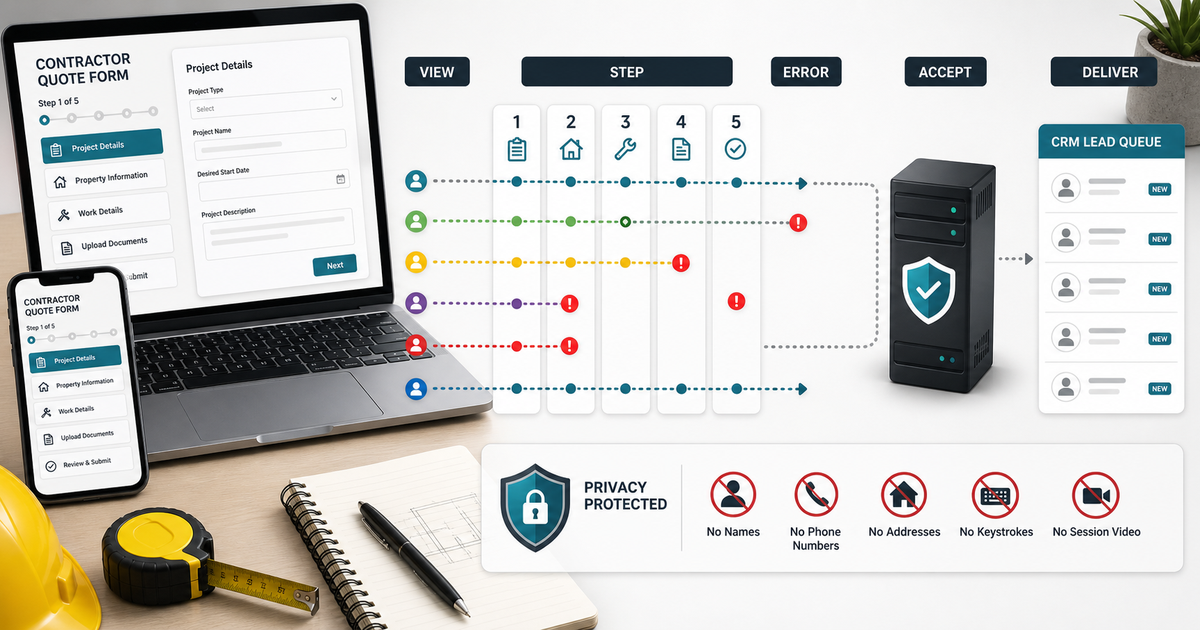
A contractor replaces a short contact form with a polished multi-step quote form. Traffic stays steady, but completed requests fall. The first reaction is often to install session replay, capture every keystroke, or shorten the whole form.
That reaction skips the useful question: where does the request stop, and was the stop caused by intent, validation, a technical fault, or the handoff after submission?
A defensible form conversion rate can be measured without recording names, phone numbers, addresses, project descriptions, or screen videos. The practical method uses a small event model, stable denominators, error categories, and completed lead records. It reveals the failing step while keeping customer-entered values out of the analytics trail.
Short answer
For a contractor quote form abandonment analysis, record only the form version, anonymous session identifier, step name, event time, device class, broad traffic source, validation outcome, and final submission result. Do not send raw field values to analytics.
Calculate progression from eligible form views to starts, step completions, valid submit attempts, accepted submissions, and CRM arrivals. Keep validation failure, network failure, duplicate prevention, spam rejection, and voluntary exit as separate states.
The minimum useful review answers five questions:
- How many eligible visitors saw each form version?
- Which step was the last completed step?
- Which error category appeared before exit?
- Did the web form confirm acceptance?
- Did the accepted request arrive in the correct inbox or CRM queue?
This shows where to investigate. It does not reveal why every individual visitor left, and it should not be presented as proof of intent.
Define the decision before adding tracking
Instrumentation should support a decision, not create a larger pile of events.
Write down the change the team is considering. Examples include removing an optional budget question, splitting one crowded step, fixing mobile address validation, clarifying the service-area boundary, or repairing a broken CRM handoff.
Then define the evidence that would justify that change. A useful statement looks like this:
If mobile visitors repeatedly reach the contact step, receive the same validation category, and do not produce accepted submissions, we will reproduce that validation path and fix the defect before removing fields.
That is more useful than "increase conversions." It names the segment, observable event, suspected mechanism, and next action.
Keep the denominator stable
The form conversion rate can change simply because the denominator changed.
A page view is not always an eligible form view. Employees, test monitors, bots, repeat reloads, and visitors outside the service area can inflate the count. A form start may mean the first focus event in one version and the first completed field in another.
Use a written measurement ladder:
| Stage | Operational definition | Common exclusion |
|---|---|---|
| Eligible view | Form rendered and usable for a non-test visit | Bot, employee test, failed render |
| Start | First intentional interaction with the form | Autofill probe or accidental focus |
| Step complete | Required fields on that step passed local validation | Back navigation without completion |
| Submit attempt | Visitor activated the final submit control | Disabled-button clicks |
| Accepted submit | Server returned the defined success result | Validation, rate limit, network failure |
| Delivered lead | Accepted request appeared in the intended system | Queue, webhook, or mapping failure |
Keep these definitions the same before and after a change. If the implementation changes the definition, mark a measurement break and start a new baseline.
Use a privacy-limited event schema
The safest useful event says what happened to the workflow, not what the customer typed.
A compact schema can include:
| Field | Example | Purpose |
|---|---|---|
event_name | quote_step_complete | Identifies the workflow event |
form_version | roofing_quote_v3 | Separates releases |
step_id | service_location | Locates progression |
event_at_utc | ISO timestamp | Orders events consistently |
anonymous_flow_id | Rotating random value | Connects events within one attempt |
device_class | mobile | Supports broad device review |
source_group | organic | Supports broad acquisition review |
validation_category | required_missing | Finds error patterns without values |
result_state | accepted | Separates success and failure |
Do not place a name, phone number, email address, street address, free-text project note, uploaded file name, exact URL query string, or full IP address in this event payload. Review retention and access with the business's privacy and security owners before release.
Mark starts without counting accidental touches
Mobile browsers, password managers, and autofill tools can focus a field without a person intending to submit a quote.
A more stable start event can fire after one of these bounded signals:
- A user changes a selectable service field.
- A user completes the first required non-sensitive choice.
- A user advances from the introduction to the first question step.
- A user spends a minimum interval in the form and interacts again.
Choose one rule and keep it consistent. Do not combine several start definitions in the same report unless each is separately labeled.
Separate validation errors from abandonment
A visitor who sees an error and leaves is not the same as a visitor who simply closes the page.
Record a category, not the rejected value. Useful categories include:
- Required field missing.
- Format not accepted.
- Selection outside service scope.
- File type or size rejected.
- Date or time unavailable.
- Server validation unavailable.
- Rate limit or duplicate protection.
- Unknown validation failure.
Track whether the visitor recovered from the error and completed the step. A high error count with a high recovery rate may indicate harmless guidance. A smaller count with almost no recovery may identify a blocking defect.
Never infer that a phone number, address, or email was false merely because a format rule rejected it. The rule itself may be wrong.
Measure form field drop-off without session replay
To measure form field drop-off without session replay, instrument step entry, step completion, validation category, back navigation, and final result. Avoid per-keystroke events and avoid copying field contents into event labels.
For a one-page form, group fields into meaningful sections such as service, location, schedule, project context, and contact. Emit a section-complete event only when the section's required checks pass. This creates a progression path without recording which exact address or project description was entered.
The last observed event is not automatically the cause of exit. A flow ending after project_context_enter only shows that no later event arrived. The person could have been interrupted, opened another tab, lost connectivity, or rejected the question. Treat it as a location for investigation, not a diagnosis.
Analyze multi-step progression with counts
Percentages need counts beside them.
| Form stage | Eligible flows | Completed | Progression rate | Error flows | Accepted leads |
|---|---|---|---|---|---|
| Service choice | |||||
| Service location | |||||
| Timing | |||||
| Project context | |||||
| Contact | |||||
| Final submit |
Use one flow per denominator at each stage. Do not divide step completions by raw event count because repeated errors, back navigation, and reloads can create multiple events from one attempt.
When you improve multi-step quote form completion rate, optimize the verified bottleneck rather than the step with the most total exits. Early steps naturally contain more visitors, so they may also contain more exits even when their progression rate is healthy.
Segment without creating tiny, misleading groups
Broad segments can reveal a defect that the total hides. Excessive segmentation can manufacture noise.
Start with operationally meaningful groups:
- Mobile, desktop, and tablet.
- Organic, paid, local listing, referral, direct, and unknown source.
- Emergency and planned service.
- Core area, extended area, outside area, and unresolved location.
- Business hours and after hours.
- New form version and prior form version.
Show the count for every segment. Combine or suppress groups that are too small for a sensible comparison. Do not treat a single lost flow as a trend.
Avoid user-level profiling. The goal is to repair the intake workflow, not to reconstruct a person's browsing history.
Distinguish customer choice from technical failure
An exit can happen because the visitor did not want to continue. It can also happen because the interface failed.
Review technical evidence around the same step and time window:
- JavaScript errors tied to the form version.
- Slow or failed API requests.
- Third-party address or calendar service outages.
- Submit controls hidden by a mobile keyboard.
- Error text outside the visible viewport.
- Upload failures on slower connections.
- Confirmation pages that load without creating a lead.
- Duplicate-prevention rules that reject legitimate retries.
Aggregate technical logs by error signature. Do not place customer field values in error messages. Reproduce the path with synthetic test data before changing copy or removing questions.
Audit the accepted-submit handoff
The browser success message is only one checkpoint.
A request can be accepted by the website but fail before it reaches the sales team. Webhooks can time out, field mappings can reject a record, spam filters can quarantine an email, and a CRM automation can assign the wrong owner.
Reconcile a bounded sample across four states:
- Server accepted the submission.
- Delivery integration acknowledged it.
- The intended inbox or CRM created the record.
- A visible owner and next action were assigned.
Use a non-sensitive correlation identifier when the systems support it. Keep customer details in the authorized operational system, not in the analytics event stream.
If accepted submissions do not arrive, changing the front-end form will not solve the loss.
Read source and service mix before changing fields
A campaign launch can make the form appear weaker even when the form did not change.
Paid social traffic may include more early-stage visitors. Emergency search traffic may prefer calling. A new service-area page may attract requests farther from the office. A promotion may increase price-shopping behavior.
Compare progression within the same broad source and service groups. Preserve unknown source as its own category instead of assigning it to direct traffic. Do not claim that a field caused abandonment when the visitor mix changed at the same time.
Test one repair at a time
Once the evidence identifies a credible bottleneck, make the smallest change that tests it.
Examples include:
- Put the accepted phone format beside the field before an error occurs.
- Change a vague service-area message into a clear boundary and alternate contact path.
- Move an optional project-detail question after contact information.
- Reduce an image upload requirement to an optional post-submit step.
- Keep entered values when the visitor moves backward.
- Move a hidden mobile error into the visible focus area.
Record the form version and release time. Compare matched days and source groups. Keep outcome maturity visible, because more completed forms do not automatically mean more qualified or booked work.
Connect completion to lead quality
A higher form conversion rate is not enough if the new requests are unusable or outside scope.
For accepted leads, review operational outcomes with stable definitions:
- Valid service request.
- Reachable contact route.
- Correct service area.
- Human response verified.
- Appointment or estimate scheduled.
- Explicitly declined or out of scope.
- Still open with a next action.
- Unknown because evidence is missing.
Do not count every open lead as lost. Do not count an automated acknowledgment as a human response. Do not call a form change successful based only on more submit events.
Build a weekly review that leads to action
A practical weekly review can fit on one page:
| Review block | Question |
|---|---|
| Volume | Did eligible views, starts, or source mix change? |
| Progression | Which step had the largest rate change with adequate count? |
| Errors | Which validation or technical category failed to recover? |
| Delivery | Did accepted submissions reach the correct queue? |
| Quality | Were delivered leads valid, reachable, and in area? |
| Decision | What single repair, test, or hold follows from the evidence? |
Keep a release annotation beside the chart. A graph without form versions, campaign changes, outages, staffing changes, and service-area changes invites the wrong conclusion.
A bounded AI Cleanup Doctor review
AI Cleanup Doctor can review a redacted sample of up to 25 flow summaries and lead handoff rows without requiring session replay or a CRM login. The useful packet contains form version, anonymous flow ID, step events, validation categories, accepted-submit state, delivery state, broad source, broad service group, first-response evidence, and current outcome.
The review can return:
- A step-by-step reconciliation table.
- Suspected measurement breaks and technical handoff gaps.
- A list of fields or events that should be removed from analytics.
- One prioritized repair or test with the evidence behind it.
- Questions that still require the contractor, developer, or privacy owner.
The review cannot identify an individual visitor's private reason for leaving, guarantee a higher completion rate, or replace technical, privacy, or legal review.
Pre-release checklist
Before the tracking change goes live, verify:
- Event names and form versions are documented.
- No raw customer-entered values appear in analytics payloads.
- Test traffic can be excluded without hiding real failures.
- Validation categories do not contain rejected values.
- Anonymous flow identifiers rotate and have a retention limit.
- Server acceptance and downstream delivery are separate states.
- Mobile focus, keyboard, back navigation, and error placement are tested.
- A synthetic submission reaches the correct test destination.
- Dashboards show counts beside rates.
- The team knows who investigates each failure category.
If any item is unclear, hold the measurement change until the owner can verify it.
Frequently asked questions
Do I need session replay to find a weak quote-form step?
No. Step-entry, step-complete, validation-category, submit-result, and delivery events can identify where the workflow fails without recording the screen or customer-entered values. Reproduction with synthetic data can then confirm the defect.
What is the best denominator for a contractor quote form?
Use more than one stage when needed. Eligible views show overall reach, starts show intentional engagement, and accepted submissions show server-confirmed completion. State the definition and exclusions for each denominator.
Can I track which field caused the error?
You can record a stable field identifier and a broad error category, provided the implementation does not copy the rejected value into analytics or logs. Review the design with the appropriate privacy and security owners.
How long should I collect data before changing the form?
There is no universal number of days. Wait for enough comparable flows across normal operating days and important source/device groups. A verified technical defect can be fixed immediately, but a preference-based redesign needs a stronger baseline.
Does a lower step-completion rate prove the question is bad?
No. The step may contain a validation defect, service-area boundary, third-party outage, mobile layout problem, or naturally selective question. Use error, technical, source, and downstream lead evidence before removing it.
How do I improve multi-step quote form completion rate without lowering lead quality?
Fix confirmed technical and clarity problems first, retain the minimum information needed for safe routing, and compare accepted leads using stable validity and reachability definitions. Move optional detail later instead of deleting every qualifying question.
Final takeaway
The strongest contractor quote form abandonment analysis does not watch people type. It measures the workflow with limited, well-defined events, separates validation from technical failure, reconciles accepted submissions with delivered leads, and keeps counts beside rates.
That is enough to measure form field drop-off without session replay and choose a specific repair. It also protects the distinction that matters most: more form events are not the goal. More usable, correctly delivered customer requests are.