Deep SEO/GEO field guide
How to Preserve Lead Consent When You Rebuild a Contractor Website Form
Learn how to preserve consent text, timestamps, source pages, and field mappings when a contractor rebuilds a lead capture form or changes CRM routing.
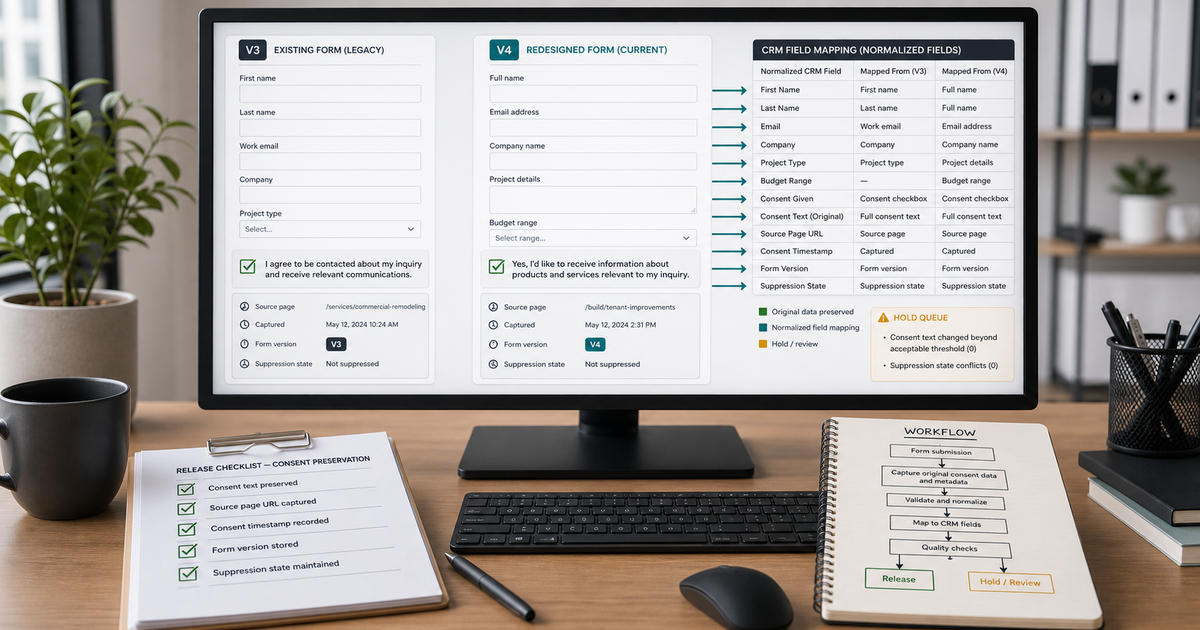
A new website can make the old lead spreadsheet look deceptively simple.
The redesigned form may have fewer fields, clearer service choices, and a cleaner route into the CRM. Meanwhile, the old export still contains records created under different checkbox wording, different hidden fields, and perhaps a different call-to-action entirely. If those rows are merged without preserving their original context, one consent = yes column can end up describing several different things.
That is a risky foundation for automation. A lead capture form does more than collect a name and phone number. It records what the visitor saw, what they submitted, when they submitted it, and which follow-up expectation the page created.
The practical goal of a form rebuild is not to make old and new rows look identical. It is to keep enough evidence to explain each row.
Short answer
Before replacing a contractor website form, save the exact visible consent text, checkbox behavior, privacy link, source URL, hidden fields, routing rules, confirmation message, and timestamp format. Give the new form a version identifier. In the CRM, preserve the original submission fields and map normalized fields separately.
To preserve consent records after a website migration, treat each lead capture form version as evidence with its own wording, control behavior, active dates, source pages, and destination mapping.
Do not turn a missing value into no, and do not turn a legacy yes into permission for a channel or purpose the old form never named.
A migration-ready record should show:
- The form version that created it.
- The exact consent language shown at that time.
- Whether the control was checked, optional, required, absent, or unknown.
- The source page and original submission timestamp.
- The channel and purpose the language appeared to cover.
- Any later opt-out or customer preference.
This is operational evidence, not a legal conclusion. Applicable requirements vary by location, channel, message type, and business practice. A qualified adviser should review uncertain compliance questions.
Why one consent column is not enough
The word consent can refer to several actions.
A customer might agree to receive an estimate callback. A separate checkbox might cover promotional text messages. Submitting an emergency-service request may create a reasonable expectation of a service response, but that does not automatically answer whether later marketing is appropriate. A privacy-policy acknowledgment is also different from an affirmative channel choice.
When a website rebuild compresses these into one field, the CRM loses the distinction. The value may still say true, but nobody can tell what the customer actually saw.
I would rather keep four plain fields than one confident-looking flag:
consent_control_stateconsent_text_versionconsent_channel_scopeconsent_purpose_scope
If a source does not provide one of those facts, use unknown or not captured. That is more useful than filling the gap with a guess.
Freeze the old form before changing it
The easiest evidence to lose is the evidence that only exists in the page itself.
Before the old form is unpublished, capture:
- A full-page screenshot at desktop and mobile widths.
- The visible labels, helper text, error text, and checkbox language.
- Whether each checkbox is selected by default.
- Links to the privacy policy and terms as they appeared on that page.
- The form action, webhook destination, and CRM integration name.
- Hidden fields, campaign parameters, source tags, and form ID.
- The confirmation page or on-screen success message.
- A sample notification email with test data.
- The time zone used by the form and destination systems.
Use clearly fictional test values. Do not capture a real customer's personal details for this purpose.
Store the evidence with a date and a version label such as estimate-form-v3-retired-2026-07-20. A screenshot called old-form-final.png becomes ambiguous after the next redesign.
Give every form version a durable ID
A visual redesign is not the only change that deserves a new version.
Create a new identifier when any of these change:
- Consent wording.
- Checkbox default or required state.
- Follow-up channel named in the form.
- Service-request purpose.
- Privacy or terms link destination.
- Hidden source values.
- CRM field mapping.
- Confirmation language.
- Vendor, form builder, webhook, or routing path.
The version ID should travel with every submission. A hidden field such as form_version=estimate-v4 works when it is controlled and tested. The CRM can also stamp the version during ingestion, provided the rule is documented and cannot silently label old records as new ones.
Do not derive the form version later from the record's create date alone. Deployments can overlap, cached pages can remain active, and integrations can retry old submissions after a release.
Preserve the exact text, not only a version number
A version ID is useful only while its definition remains available.
Keep a small registry for retired and active versions:
| Field | What to retain |
|---|---|
form_version | Stable ID written with the submission |
active_from | First verified production time |
active_to | Last verified production time or active |
visible_consent_text | Exact wording shown to the visitor |
control_behavior | Optional, required, default off, default on, or absent |
channel_scope | Call, email, SMS, multiple, or unclear |
purpose_scope | Requested service, estimate, updates, marketing, or unclear |
policy_url_snapshot | URL and archived version reference |
source_pages | Pages where the form appeared |
destination_mapping | CRM and notification fields receiving each value |
Plain text is easier to review than a screenshot alone. Keep both. The screenshot proves placement and presentation; the text registry makes field-level comparison possible.
Map old and new CRM fields without overwriting history
During a rebuild, teams often rename fields to make reporting cleaner. sms_ok becomes marketing_consent. contact_method becomes preferred_channel. form_name becomes lead_source_detail.
Those names are not necessarily equivalent.
Build a crosswalk before importing or merging anything:
| Old field | New field | Relationship | Safe migration action |
|---|---|---|---|
sms_ok | marketing_sms_consent | Possible match, wording-dependent | Map only when old text explicitly supports it |
contact_method | preferred_channel | Similar, not identical | Preserve raw value and label interpretation |
form_name | form_version | Not equivalent | Keep old form name; assign version from evidence |
| Blank | consent_text_version | Missing historically | Set not captured, not current version |
created_at | submitted_at_raw | Possible source timestamp | Preserve raw timestamp and time-zone rule |
To map old and new CRM form fields safely, document whether each relationship is exact, conditional, transformed, or unavailable. The word “mapped” should not imply that the values meant the same thing.
Keep the original columns in the migration file. Add normalized fields next to them. That gives a reviewer a way back to the evidence if a mapping rule changes.
Separate missing, false, and unknown
These values are easy to collapse during import:
false: the form captured the control and it was not selected.true: the control was selected under a known version.absent: that form version did not include the control.blank: the field exists, but no value arrived.unknown: the evidence cannot establish the state.not applicable: the field did not apply to that route or purpose.
Turning all non-true values into false makes reporting look complete but removes useful distinctions. Turning blanks into true because “the customer submitted the form” is worse.
Preserve the source state first. A normalized decision field can later group values for a specific, documented workflow.
Keep the original timestamp and source page
A consent value without a timestamp and source page is difficult to interpret.
The page shows the visitor's context. A roof-leak emergency page, a newsletter page, and a financing inquiry may use different language and create different expectations. The timestamp connects the row to the form version that was live when the request arrived.
For each submission, retain:
submitted_at_rawsubmitted_at_timezonesubmitted_at_utcsource_url_rawreferrer_raw, when available and appropriate to retainform_versioningested_at
Do not replace the raw timestamp with the normalized UTC value. Keep both. If the time zone is unknown, mark it unknown rather than choosing the business's current setting.
Test the new route as a complete conversation
A successful form submission does not prove the handoff works.
Use fictional test records and follow them through every system:
- Load each page that contains the form on desktop and mobile.
- Confirm the visible text, checkbox state, policy link, and required indicators.
- Submit one allowed test for each meaningful control state.
- Read the confirmation message exactly as a visitor sees it.
- Check the notification email, CRM record, owner, task, and timestamp.
- Verify that the form version and source page survived.
- Confirm that no follow-up automation starts from a blank, absent, or unknown permission field.
- Delete or label the test record according to the business's test-data policy.
Avoid real phone numbers or email addresses unless the test owner explicitly controls them and the test plan requires delivery. A non-delivery test can still verify field mapping and routing.
Audit cached pages, embeds, and duplicate forms
Rebuilds often leave more than one form active.
An old landing page may remain indexed. A page-builder template may still contain the retired embed. A cached page can serve an earlier form to some visitors. Paid ads may point to a campaign page that the redesign did not touch. A third-party booking widget may have its own consent text.
Create an inventory of every form endpoint and embed. Check:
- Main navigation pages.
- Service and location pages.
- Paid campaign landing pages.
- Blog call-to-action blocks.
- Popup or chat widgets.
- Scheduling and financing embeds.
- Cached or archived routes still receiving traffic.
Each active route needs an owner, a version, and a known destination. If an old form must remain temporarily, keep its evidence and route separate rather than silently mapping it as the new version.
Reconcile opt-outs after migration
The newest form submission is not always the newest preference event.
A customer may have submitted an estimate request, later opted out of texts, and then appeared in a migration file with the original consent flag. If the import overwrites the current suppression state, automation can restart contact that had already stopped.
Treat opt-outs and do-not-contact records as protected evidence. Before activation:
- Identify the current suppression source of truth.
- Export a dated suppression snapshot.
- Compare migrated records against it.
- Prevent older form values from overwriting newer preference events.
- Test that the destination system honors suppression before any campaign or sequence starts.
When sources conflict, hold the row. Do not choose the value that enables more outreach.
What a useful migration review returns
A good review does not return one percentage called “clean consent.” It returns decisions someone can inspect.
Useful outputs include:
- Form-version registry.
- Old-to-new field crosswalk.
- Rows with exact source evidence.
- Rows missing form version, timestamp, source page, or visible text.
- Values that changed meaning during mapping.
- Suppression conflicts.
- Duplicate or legacy forms still active.
- Test records and expected outcomes.
- A hold queue with a specific reason for each unresolved row.
This is the right level of detail to audit contractor lead forms before automation. It shows where the workflow is ready and where more source evidence is needed.
How AI Cleanup Doctor can review a bounded sample
AI Cleanup Doctor can review a redacted sample of up to 25 lead rows without requiring a CRM login. For a form-migration check, useful fields include form version, raw checkbox value, exact consent-text reference, source URL, raw timestamp, normalized timestamp, lead source, current status, latest message, owner, and suppression state.
Remove names, message details, and other personal information that are not needed for the question. Use version labels or redacted references instead of customer identifiers.
The review can separate rows into ready, hold, missing context, mapping conflict, duplicate candidate, and do-not-contact outcomes. It can also show which form or CRM fields need clearer definitions.
It cannot determine legal compliance from a spreadsheet alone. It also cannot prove that a visitor saw a page if the form version, source route, and timestamp evidence were never retained.
Before turning automation back on
Use a final release gate:
- Every active form has a verified version ID.
- Visible wording and control behavior match the registry.
- Old and new fields have a documented crosswalk.
- Raw values remain preserved.
- Missing, false, absent, and unknown are distinct.
- Source URL and timestamp survive the route.
- Suppression state cannot be overwritten by older form data.
- Fictional test records reach the expected owner and task.
- Unknown or conflicting rows enter a hold queue.
- Someone is accountable for reviewing that queue.
If any of these fail, keep automation paused for the affected route. The website can still accept requests while a human handles the uncertain handoff.
Frequently asked questions
Should every website redesign create a new form version?
Not every color or layout change needs a new data version. Create one when wording, checkbox behavior, channel, purpose, policy destination, hidden values, routing, field mapping, confirmation language, or vendor changes. Record the verified production time even for visual-only changes so the release history remains clear.
Can we use the submission date to infer which form version a lead saw?
Only as supporting evidence. Cached pages, overlapping deployments, retries, old landing pages, and third-party embeds can cross the release boundary. A version written with the submission is stronger than a later date-based guess.
Is a blank consent field the same as no?
No. Blank may mean the value failed to arrive, the control was absent, or the integration did not map it. Preserve the blank and determine the source condition. Use false only when the captured control state supports it.
Can old consent be copied into a new CRM field?
Only when the old language and control behavior support the new field's specific meaning. Keep the original value and text version. If the relationship is conditional or unclear, document it and hold the row rather than widening the scope.
What if the privacy policy URL stayed the same but its content changed?
Keep an archived reference or dated copy for each relevant form version. A stable URL does not prove the linked content was unchanged when the submission occurred.
Does preserving consent evidence mean the business can contact the lead?
No. It preserves facts needed for a decision. Current permission, purpose, channel, opt-outs, message context, local requirements, and business policy still need review before contact.